Building an AI Support Engineer: How I Built the Pluto RAG Chatbot
August 17, 2025
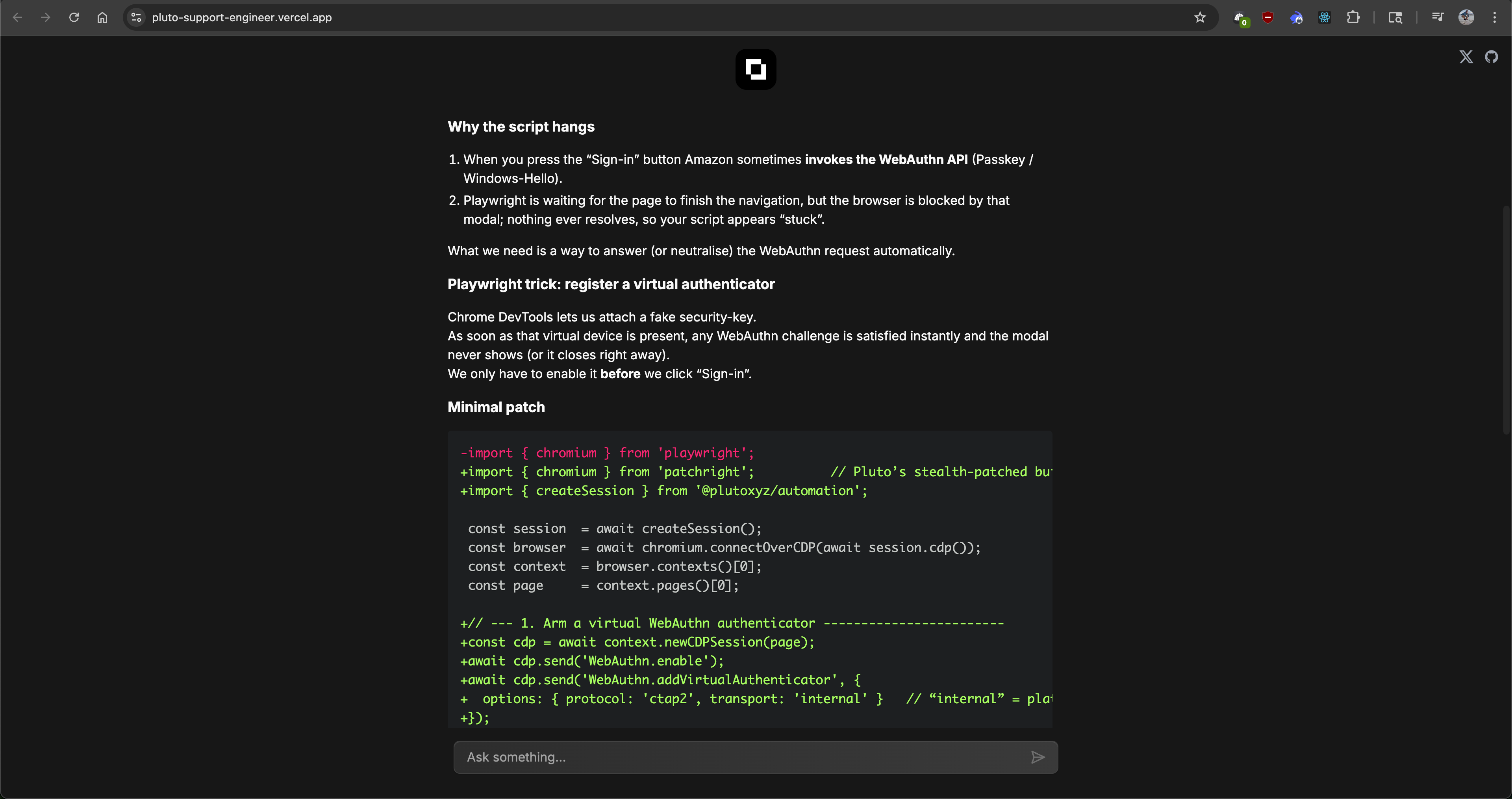
Pluto RAG Chatbot UI example
TL;DR: I built a RAG chatbot to help Pluto’s developers debug and write automation scripts. Developers repeatedly told us debugging these scripts was quite difficult, so the goal was to create a self-service tool to help them debug, since chatgpt and claudewere not effective.
Try it live: pluto-support-engineer.vercel.app
Background
The Pluto frame allows developers to create reusable automation scripts that their users can run to extract and verify any web data. Under the hood it uses Playwright and custom Pluto apis to run the automation. Playwright is an open-source automation framework by Microsoft for testing and scraping web applications.
Writing these automation scripts is tricky because retrieving web data, especially authenticated data, usually involves multiple steps with many different variables. There are multiple ways to login (username/password, oauth, etc), 2FA with passkeys, sms codes, and finally, actually obtaining and scraping the required data (different DOM layouts per device, changing selectors and classes, etc). Our Automation Script Developer Guide has an extensive list to help troubleshoot, but it's far from exhaustive.
Unfortunately, even the best LLMs are not (currently) effective at helping debug these scripts. The scripts contain custom Pluto APIs, and there are simply too many edge cases to explore. So we needed a custom solution.
What is RAG?
RAG stands for retrieval augmented generation. It basically means you provide the LLM with additional specific context along with the user’s prompt. This is most useful for real-time, specific, or private information (such as proprietary or internal data, private code repos, etc) that LLMs don’t have access to. Providing this context improves accuracy and reduces hallucinations.
My theory was that Claude could be a lot more effective at helping fix broken scripts if it had context about what we were actually doing and how it worked. The Pluto frame codebase is currently private (future plans to open source). However, we also have tons of production and in-progress automation scripts, internal documents, and tips for troubleshooting bugs we’ve personally run into. If the relevant information could be sourced and added to the user’s prompt, LLMs could actually articulate useful solutions.
Tech Stack
This a full stack application built with a standard industry stack and tools, focusing on type safety and speed.
- Framework: Next.js (App Router)
- AI SDK: Vercel AI SDK (for streaming & providers)
- Database: Supabase (Postgres) with pgvector (vector search)
- ORM: Drizzle ORM (strict schema typing)
- Validation: Zod (type-safe API inputs/outputs)
- AI/Embeddings: OpenAI text-embedding-3-large (embeddings) & o3 or gpt-4o (chat)
- Infrastructure: Vercel Edge Functions (for streaming) & GitHub Actions (for CI/CD)
Architecture
The codebase has two main pipelines: Ingestion (for creating the embeddings and retrieval context for RAG) and Inference (the actual Chat UI web app)
/
├── app/ # Next.js App + API routes
├── components/ # Chat UI components
├── lib/
│ ├── ai/ # runtime embedding generation & retrieval
│ └── db/ # Drizzle ORM setup, migrations, schema
├── scripts/ # indexing + embed pipeline
├── RAG-training/ # Files (Docs, Playwright scripts, debug tips, etc) for context
└── SYSTEM_PROMPT.js # prompt engineering - actually extremely important
What is an embedding?
Embeddings are numerical representations of real world objects. They convert words, phrases, or images into vector values, which represents their semantic meaning. The “distance” (difference) between words can be used to measure their proximity to other words, which shows similarity. For instance, "cat" and "dog" vectors would be close together.
How It Works: The Pipelines
1. Embedding Pipeline
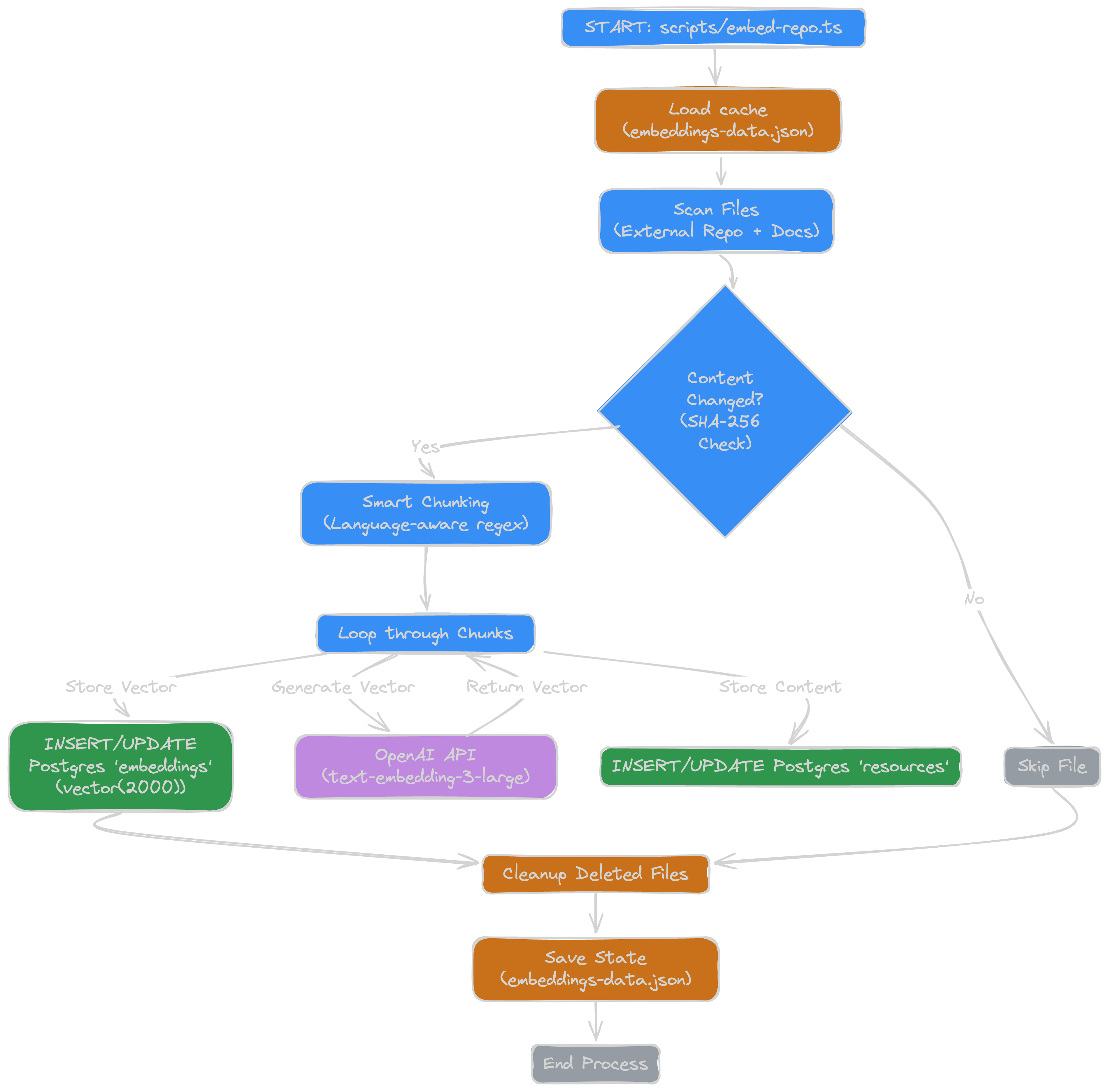
- Source Scanning: Scans our internal SDK repo, docs, production scripts, etc
- Content Hashing: Calculates a SHA-256 hash for every file. If the hash matches our previous run, we skip it - saving time and OpenAI credits.
- Smart Chunking: Splits code files by file type / language and semantic units (functions/classes, markdown headers, etc) using regex, rather than arbitrary character counts.
- Embedding: generate embedding using openai’s
text-embedding-3-largemodel - Storage: saves chunks and embeddings to Postgres using Drizzle ORM.
2. Inference Pipeline (Runtime)
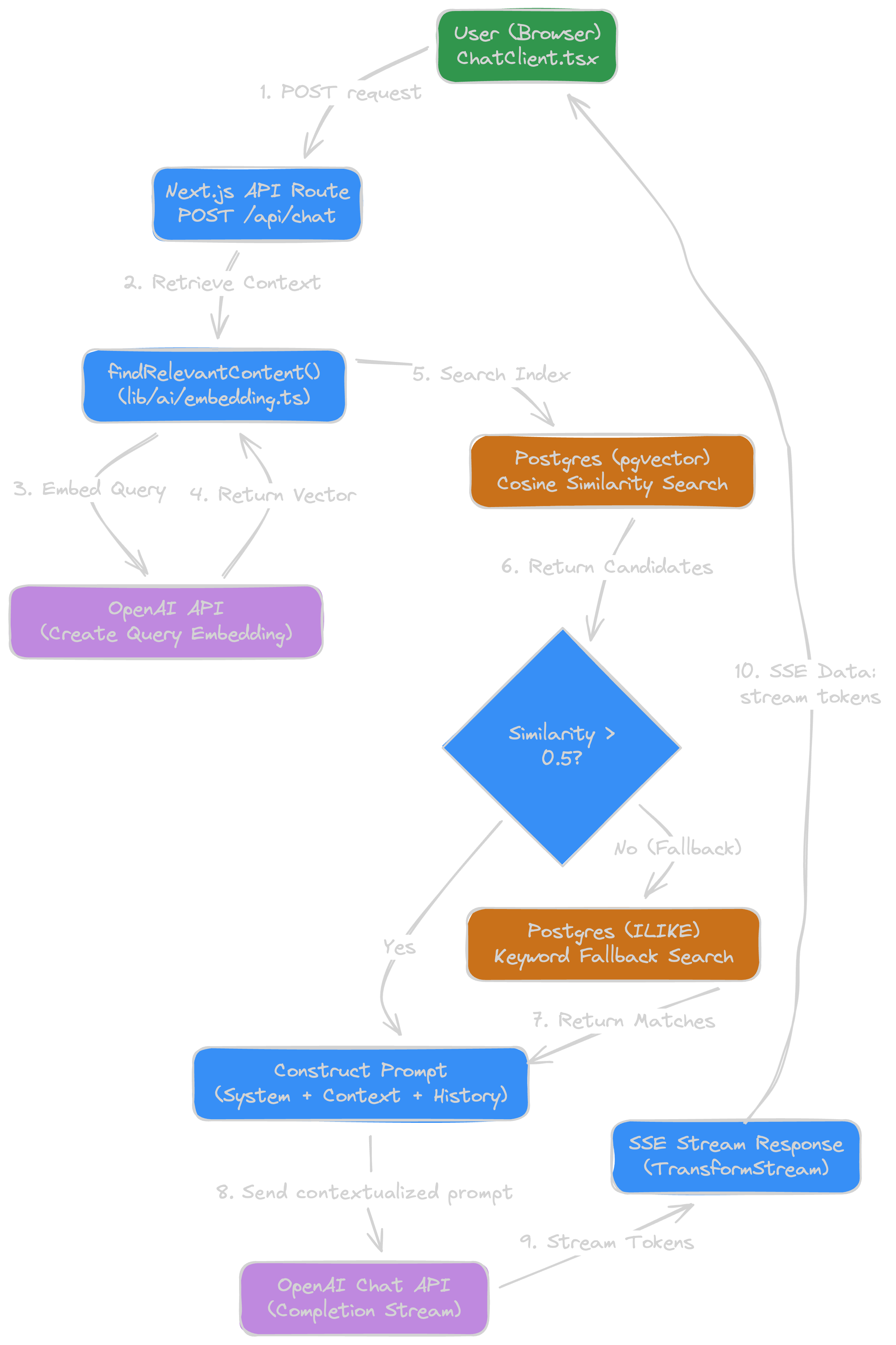
This is what happens when a user actually asks a question:
- Prompt: User asks question in the web chat UI.
- Request:
POST /api/chatreceives the prompt and user message history (for context and multi-turn coherence) - Retrieval: We create an embedding of the query and use that vector to perform a cosine similarity search in Postgres to find relevant chunks. If no matches, default to keyword search.
- Context assembly: top results are formatted and added to the system prompt.
- Generation: system prompt + results + user query sent to openai chat api (using o3 model for accuracy, at the cost of latency)
- Response: the response is streamed back token by token to client using SSE (Server-Sent Event) stream option in openai api via vercel edge function.
- Logging: prompt + full response + metadata async saved to
conversationstable in Postgres.
Retrieval
I think the two most interesting parts of this project are the smart chunking logic for embedding, and then how we find it again.
-
Smart Chunking (Regex Maps)
Standard chunking just sets a fixed token or char length and splits that way. That is horrible for context, because you lose relevant related information that’s cut off. Instead, first identify the file type, language, etc, and then splitting text semantically keeps the context together and useful. As a small snippet, here’s a few language boundaries I used:
const languageBoundaries: { [key: string]: RegExp } = { rust: /}\s*\n|\n\s*fn\s|\n\s*struct\s|\n\s*enum\s|\n\s*mod\s/, go: /}\s*\n|\n\s*func\s|\n\s*type\s/, typescript: /}\s*\n|\n\s*function\s|\n\s*class\s|\n\s*const\s+\w+\s*=\s*\(/, python: /\n\s*def\s|\n\s*class\s/, // ... more languages }; -
Hybrid Retrieval (Vector + Keyword)
Vector search works most of the time, but I found sometimes specific errors or some variables wouldn’t be matched. To fix this, I added a keyword search as a fallback if the vector search returns low similarity results (below 0.5).
// First, try vector search
const qVec = await generateEmbedding(question)
const distance = cosineDistance(embeddings.embedding, qVec)
const similarity = sql<number>`1 - (${distance})`

// ANN filter
const conditions = [gt(similarity, MIN_SIM)] // relevance cutoff, lower to relax

// ... query db ...
let rows = await db.select({...
// Fallback: If results are weak, use keyword search
if (rows.length < 3) {
 const keywords = question.split(/\W+/).filter((w) => w.length > 3)
  const kwQuery = db
   .select({ /* ... */ })
   .from(embeddings)
   .where(
      sql.join(keywords.map((k) => sql`content ILIKE ${'%' + k + '%'}`), sql` OR `)
   )
}
Trial and Error
I think the most difficult part of this project was the nature of qualitative measurements vs quantitative. It’s not like programming where the code is the code, and most can be deterministic (am I too optimistic?). LLMs are not deterministic (in theory they can be, but aren’t used this way in practice). So while building this, I repeatedly had hard test prompts that I knew the answer and solution too, and kept tuning for increased accuracy.
-
System Prompt
This may be obvious if you’ve worked with a custom chat interface before, but it blew my mind how much of a difference the default system prompt made to the results. Without a detailed system prompt, the answers from gpt-4o were literally useless. Chatgpt and claude have system prompts that are thousands of words long (claude is over 15k words as this writing).
const SYSTEM_PROMPT_BASE = `You are Pluto's Playwright-based web automation assistant, acting like a senior developer guiding the debugging and improvement of automation scripts. Your tasks: - Remain aware that you cannot see the actual webpage DOM or screenshots unless provided. If a problem involves specific page elements or selectors, clarify that you are guessing based on the info given and politely request an HTML snippet or relevant DOM excerpt to confirm details. - Provide precise and safe code edits (preferably minimal changes) to resolve issues, focusing on Playwright best practices and Pluto's automation SDK patterns. For example, encourage using explicit waits (like \`waitForSelector\` or \`waitForNavigation\`) instead of arbitrary timeouts, and using Pluto-specific functions like \`createSession()\` to initialize sessions or \`prove()\` to verify outcomes when appropriate. - Always use Pluto's custom automation functions if they apply (such as \`createSession\`, \`prove\`, or others in Pluto's SDK) to illustrate their usage in solutions. When showing examples, only import our patched browser: import { chromium } from 'patchright' //patched, stealthier Playwright build and Pluto helper import { createSession } from '@plutoxyz/automation'; as all scripts are required to have these - Format your responses in a clear, friendly, and professional manner using Markdown. Use bullet points or numbered steps to break down reasoning and solution approaches when helpful. Use inline code formatting for references to code and use fenced code blocks (with language tags) for multi-line code suggestions or patches. - Model a chain-of-thought reasoning: walk through the likely causes or steps to identify the problem, and then converge on a solution. Explain assumptions and check them. - Avoid hallucinating or making up nonexistent selectors, element IDs, or text. If the exact selector or text is unknown, describe what it might be (for example, a button with text "Submit") or ask the user for clarification or HTML content. - If an issue cannot be fully resolved without more information (especially when a selector or specific DOM structure is involved, a lot of problems cant be resolved without the html snippet), explicitly ask the user to provide the relevant HTML snippet or additional details to proceed safely. -
Tuning the Similarity Threshold
RAG is a balance between noise and signal loss. I started with a strict similarity threshold of
0.78, basically saying "Only show me content that is semantically identical to the question." I got no results. I found that the0.5-0.6range was the best for relevant content. I lowered the gate to0.5to let more context in, so the LLM could filter out anything irrelevant. The analogy chatgpt gave me to better understand this is that vector similarity should be thought of as more of a compass vs a percentage score on a test (which was my previous mental model). I was thinking of 0.5 as 50%, which seemed bad, but instead, 0.5 cosine score is pretty significant and usually means the content is in the same semantic area (especially with a large 2000 dimension vector). -
Defensive prompt engineering
This is kind of related to the first system prompt discovery, but the LLM loved to hallucinate things that didn’t exist. I basically had to explicitly instruct it to admit when it doesn’t know or is missing content - “Admit when it doesn't see a selector in the context” or “Ask the user for their HTML/DOM snippet if it's missing”.
Performance/ UX
-
"Fire-and-Forget" Conversation Logging
I log conversations for chat history. By not awaiting the database write for logging the conversation (which doesn’t matter to the user), I was able to shave off around ~300-500ms of latency per request.
-
Cryptographic Content Hashing
Especially during building and testing, I kept re-embedding the same content over and over, burning openai credits. Adding a simple SHA-256 hash check made it so I didn’t unnecessarily re-generate the same exact content.
const content = await fs.readFile(absolutePath, 'utf-8')
const fullContentHash = crypto.createHash('sha256').update(content).digest('hex')
const existingHash = pathToHashMap[absolutePath]

 if (existingHash) ... // skip re-embedding
Conclusion
I have a lot of ideas on building other useful AI support engineers. This project actually solved both our internal team problems, and our developers' problems. This was some of the most fun I’ve had building software in a long time. It also helped me understand LLMs at a much deeper level than I did before.